

- In testing and monitoring, asserting against the state of one or more elements on a page.
- In general, gathering data for a variety of different purposes.
Scraping element attributes & properties
Below is an example running against our test site, getting and printing out thehref attribute of the first a element on the homepage.
That just happens to be our logo, which links right back to our homepage, and therefore will have an href value equal to the URL we navigate to using page.goto():
basic-get-href-value.js
href value of the first a element of our homepage:
basic-get-href-handle.js
The innerText property is often used in tests to assert that some element on the page contains the expected text.
Scraping lists of elements
Scraping element lists is just as easy. For example, let’s grab theinnerText of each product category shown on the homepage:
basic-get-text-values.js
Scraping images
Scraping images from a page is also possible. For example, we can easily get the logo of our test website and save it as a file:basic-get-image.js
GET request against the source URL of the image. The response body will contain the image itself, which can be written to a file using fs.
Generating JSON from scraping
Once we start scraping more information, we might want to have it stored in a standard format for later use. Let’s gather the title, author and price from each book that appears on the home page of our test site: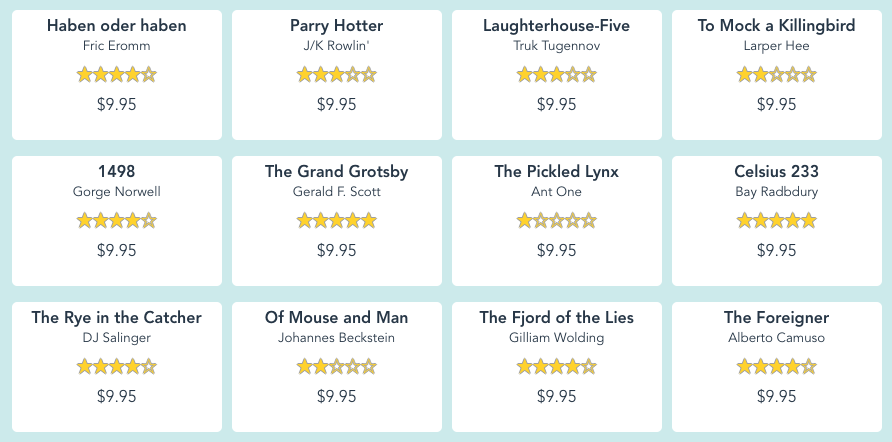
basic-get-data-json.js
books.json file will look like the following:
Further reading
- Playwright’s official API reference on the topic
- An E2E example test asserting against an element’s
innerText
Bugs don’t stop at CI/CD. Why would Playwright? 
Sign up and start using Playwright for end-to-end monitoring with Checkly.